Showing posts with label Programming. Show all posts

Sunday, August 3, 2008

F

Files in VB .NET Working with Files
File handling in Visual Basic is based on System.IO namespace with a class library that supports string, character and file manipulation. These classes contain properties, methods and events for creating, copying, moving, and deleting files. Since both strings and numeric data types are supported, they also allow us to incorporate data types in files. The most commonly used classes are FileStream, BinaryReader, BinaryWriter, StreamReader and StreamWriter.
FileStream Class
This class provides access to standard input and output files. We use the members of FileAccess, FileMode and FileShare Enumerations with the constructors of this class to create or open a file. After a file is opened it's FileStream object can be passed to the Binary Reader, BinaryWriter, Streamreader and StreamWriter classes to work with the data in the file. We can also use the FileStreamSeek method to move to various locations in a file which allows to break a file into records each of the same length.
StreamReader and StreamWriter Class
The StreamReader and StreamWriter classes enables us to read or write a sequential stream of characters to or from a file.
BinaryReader and BinaryWriter Class
The BinaryReader and BinaryWriter classes enable us to read and write binary data, raw 0's and 1's, the form in which data is stored on the computer.
The following examples puts some code to work with textual data using FileStream and StreamReader and StreamWriter classes.
Code to create a File
Imports System.IO'NameSpace required to be imported to work with files

Public Class Form1 Inherits System.Windows.Forms.Form

Private Sub Form1_Load(ByVal sender As System.Object, ByVal e_As System.EventArgs) Handles MyBase.Load

Dim fs as New FileStream("file.doc", FileMode.Create, FileAccess.Write)

'declaring a FileStream and creating a word document file named file with

'access mode of writing

Dim s as new StreamWriter(fs)

'creating a new StreamWriter and passing the filestream

object fs as arguments.BaseStream.Seek(0,SeekOrigin.End)

'the seek method is used to move the cursor to next position to avoid text to be

'overwrittens.WriteLine("This is an example of using file handling concepts in VB .NET.")s.WriteLine("This concept is interesting.")

'writing text to the newly created

files.Close()

'closing the file

End Sub

End Class
The default location where the files we create are saved is the bin directory of the Windows Application with which we are working. The image below displays that.
Code to create a file and read from it
Drag a Button and a RichTextBox control onto the form. Paste the following code which is shown below.
Imports System.IO'NameSpace required to be imported to work with files

Public Class Form1 Inherits System.Windows.Forms.Form

Private Sub Button1_Click(ByVal....., Byval.....)Handles Button1.Click

Dim fs as New FileStream("file.doc", FileMode.Create, FileAccess.Write)

'declaring a FileStream and creating a document file named file with 'access mode of writing

Dim s as new StreamWriter(fs)

'creating a new StreamWriter and passing the filestream

object fs as arguments.WriteLine("This is an example of using file handling concepts in VB .NET.")

s.WriteLine("This concept is interesting.")

'writing text to the newly created

files.Close()

'closing the file

fs=New FileStream("file.doc",FileMode.Open,FileAccess.Read)

'declaring a FileStream to open the file named file.doc with access mode of reading

Dim d as new StreamReader(fs)

'creating a new StreamReader and passing the filestream

object fs as argumentd.BaseStream.Seek(0,SeekOrigin.Begin)

'Seek method is used to move the cursor to different positions in a file, in this code, to 'the beginning

while d.peek()>-1

'peek method of StreamReader object tells how much more data is left in the file

RichTextbox1.Text &= d.readLine()

'displaying text from doc file in the RichTextBox

End while

d.close()

End Sub

Know Something about .NET

NET Defined

Before getting deeply into the subject we will first know how Businesses are related to Internet, what .NET means to them and what exactly .NET is built upon. As per the product documentation from a Business perspective, there are three phases of the Internet. The First phase gets back to the early 1990's when Internet first came into general use and which brought a big revolution for Businesses. In the First phase of the Internet Businesses designed and launched their Website's and focused on the number of hits to know how many customers were visiting their site and interested in their products, etc. The Second phase is what we are in right now and in this phase Businesses are generating revenue through Online Transactions. We are now moving into the Third phase of the Internet where profit is the main priority. The focus here is to Businesses effectively communicate with their customers and partners who are geographically isolated, participate in Digital Economy and deliver a wide range of services. How can that be possible? The answer, with .NET.

What is .NET ?

Many people reckon that it's Microsoft's way of controlling the Internet, which is false. .NET is Microsoft's strategy of software that provides services to people any time, any place, on any device. An accurate definition of .NET is, it's an XML Web Services platform which allows us to build rich .NET applications, which allows users to interact with the Internet using wide range of smart devices (tablet devices, pocket PC's, web phones etc), which allows to build and integrate Web Services and which comes with many rich set of tools like Visual Studio to fully develop and build those applications.

What are Web Services?

Web Services are the applications that run on a Web Server and communicate with other applications. It uses a series of protocols to respond to different requests. The protocols on which Web Services are built are summarized below:

UDDI: Stands for Universal Discovery and Description Integration. It's said to be the Yellow Pages of Web Services which allows Businesses to search for other Businesses allowing them to search for the services it needs, know about the services and contact them.

WSDL: Stands for Web Services Description Language, often called as whiz-dull. WSDL is an XML document that describes a set of SOAP messages and how those messages are exchanged.

SOAP: Stands for Simple Object Access Protocol. It's the communication protocol for Web Services.

XML, HTTP and SMTP: Stands for Extensible Markup Language, Hyper Text Transfer Protocol and Simple Message Transfer Protocol respectively. UDDI, WSDL and SOAP rely on these protocols for communication.

The image below shows the order of the protocols on which Web Services are built:


Example of a Web Services Application

Let's say a customer accesses a Website and buys something. The Web services of the business will communicate with the inventory system to see if there is enough stock to fulfill the order. If not, the system can communicate with the suppliers to find one or all of the parts that make up the order before filling the order. At all stages the customer will be kept informed via messages. The end result is a seamless system communicating and exchanging information easily regardless of the platform they are all running on. The business don't need to worry about going to the wrong supplier because it asks the Web service running on the supplier system what it does. And the business doesn't have to worry about the other system's methods of handling data because they communicate via SOAP and XML.

Real World Application

Microsoft's passport service is an example of a .NET service. Passport is a Web-based service designed to make signing in to Websites fast and easy. Passport enables participating sites to authenticate a user with a single set of sign-in credentials eliminating the need for users to remember numerous passwords and sign-in names. You can use one name and password to sign in to all .NET Passport-participating sites and services. You can store personal information in your .NET Passport profile and, if you choose, automatically share that information when you sign in so that participating sites can provide you with personalized services. If you use Hotmail for your email needs then you should be very much familiar with the passport service.

To find out more about how Businesses are implementing Web Services and the advantages it is providing please visit Microsoft's Website and check out the case studies published.

What is .NET Built On?

.NET is built on the Windows Server System to take major advantage of the OS and which comes with a host of different servers which allows for building, deploying, managing and maintaining Web-based solutions. The Windows Server System is designed with performance as priority and it provides scalability, reliability, and manageability for the global, Web-enabled enterprise. The Windows Server System integrated software products are built for interoperability using open Web standards such as XML and SOAP.

Core Windows Server System Products include :

SQL Server2000: This Database Server is Web enabled and is designed with priority for .NET based applications. It is scalable, easy to manage and has a native XML store.

Application Center 2000: This product is designed to manage Web Applications.

Commerce Server 2000: This powerful Server is designed for creating E-Commerce based applications.

Mobile Information Server: This Server provides real-time access for the mobile community. Now Outlook users can use their Pocket PC's to access all their Outlook data while they are moving.

Exchange Server 2000: This is a messaging system Server and allows applications on any device to access information and collaborate using XML.

BizTalk Server 2000: This is the first product created for .NET which is XML based and allows to build business process that integrate with other services in the organization or with other Businesses.

Internet Security and Acceleration Server 2000: This Server provides Security and Protection for machines. It is an integrated firewall and Web cache server built to make the Web-enabled enterprise safer, faster, and more manageable.

Host Integration Server 2000: This Server allows for the Integration of mainframe systems with .NET.

When developing real world projects if you don't know how to use the above mentioned Server's which are built for .NET based applications do not worry. Your System Administrator is always there to help you.

.NET and XML

There is a lot of connection between XML and .NET. XML is the glue that holds .NET together. XML looks similar to HTML which is readable and text-based. XML is a method of putting structured data into a text file. XML is the specification for defining the structure of the document. Around this specification a whole family of optional modules are being developed. The reason why XML is linked so much to .NET is, it's platform independent and is well supported on any environment. To move the data contained in an XML file around different organizations using different software on different platforms it should be packed it into something. That something is a protocol like SOAP.

About SOAP

SOAP, Simple Object Access Protocol is a simple, lightweight protocol for exchanging information between peers in a decentralized, distributed environment. It is an XML based protocol that consists of three parts: an envelop that describes what is in the message and how it should be processed, a set of encoding rules and a convention for representing remote procedure calls and responses.

.NET vs Java

Many of us wonder what .NET has to do with Java. Is there any relation between them? Are they similar? and so on. I even hear some people say .NET is Microsoft's answer to Java. I think every language has its own pros and cons. Java is one of the greatest programming languages created by humans. Java doesn't have a visual interface and requires us to write heaps of code to develop applications. On the other hand, with .NET, the Framework supports around 20 different programming languages which are better and focus only on business logic leaving all other aspects to the Framework. Visual Studio .NET comes with a rich visual interface and supports drag and drop. Many applications were developed, tested and maintained to compare the differences between .NET and Java and the end result was a particular application developed using .NET requires less lines of code, less time to develop and lower deployment costs along with other important issues. Personally, I don't mean to say that Java is gone or .NET based applications are going to dominate the Internet but I think .NET definitely has an extra edge as it is packed with features that simplify application development.

I hope the information above puts some light on the technology aspects behind .NET and helps you in getting started.

Monday, July 21, 2008

AutoLisp Language

AutoLISP is a dialect of Lisp programming language built specifically for use with the full version of AutoCAD and its derivatives, which include Autodesk Map 3D and Autodesk Architectural Desktop. Neither the application programming interface nor the interpreter to execute AutoLISP code are included in the AutoCAD LT product line, except in add-ons such as "LT-Extender".

AutoLISP is a small, dynamically scoped LISP (list processing language). It lacks modern LISP features such as a macro system, settable list structure or let bindings. Aside from the core language, most of the primitive functions are for geometry or the manipulation of graphical entities in AutoCAD. The properties of these graphical entities are revealed to AutoLISP as association lists in which AutoCAD "group codes" are paired with values that indicate properties such as points, radii, colors, layers, linetypes, etc.
AutoLISP code can interact with the user through primitive functions that allow the user to input points, selection sets, numbers and other data. AutoLisp also has a built in GUI mini-language, the Dialog Control Language, for creating interactive forms within AutoCAD.
; example of macro without command-line interface exposed

(defun hello_world ()
(alert "Hello World!"))

; example of macro with command-line interface hidden

(defun c:hello_world ()
(alert "Hello World!")
(princ))

; example of LISP's flexible condition handling

(cond
((= a b) (princ "\n(a) and (b) are equal"))
((and (= (type a) 'INT) (= (type b) 'INT))
(princ (strcat "\n(a)+(b)=" (itoa (+ a b)))))
((and (= (type a) 'STR) (= (type b) 'STR))
(princ (strcat "\n(a)+(b)=" a b)))
((and (listp a) (= (type b) 'SUBR))
(mapcar '(lambda (x) (princ (b x))) a)))

AutoLISP was derived from a very early version of XLISP, which was created by David Betz. The language was appropriated (stolen)[citation needed] by Autodesk for use in AutoCAD Version 2.18 in January 1986, and continued to be enhanced in successive releases up to Release 13 in February 1995. After that, its development was neglected by Autodesk in favor of more fashionable development environments (VBA, and Object ARX)[citation needed]. However, it has remained AutoCAD's primary user customization language.
Visual-LISP, a considerably enhanced version of AutoLISP including an IDE, debugger, and compiler, was developed and sold by third party developer Basis Software. Vital LISP was a superset of the existing AutoLISP language that added VBA-like access to the AutoCAD object model, reactors (event handling for AutoCAD objects), general ActiveX support, and some other general Lisp functions. Autodesk purchased this, renamed it Visual LISP, and briefly sold it as an add-on to AutoCAD 14 released in May 1997. It was incorporated into AutoCAD 2000 released in March 1999, as a replacement for AutoLISP. Since then Autodesk has chosen to halt major enhancements to Visual LISP in favor of focusing more effort on VBA and ObjectARX.
AutoLISP has such a strong following that other CAD application vendors added it to their own products. FelixCAD, BricsCad, IntelliCAD and others have AutoLISP functionality, so that AutoLISP users can consider using them as an alternative to AutoCAD. Most development involving AutoLISP since AutoCAD 2000 is actually performed within Visual LISP since the original AutoLISP engine was replaced with the Visual LISP engine. There are thousands of utilities and applications that have been developed using AutoLISP or Visual LISP.

Monday, June 30, 2008

Download Email from a POP3 Server

textBox1.Text = ""

' Create a mailman object for reading email.
Dim mailman As New Chilkat.MailMan()

' Any string argument automatically begins the 30-day trial.
mailman.UnlockComponent("30-day trial")

' Set our POP3 hostname, login and password
mailman.MailHost = "mail.chilkatsoft.com"
mailman.PopUsername = "login"
mailman.PopPassword = "password"

' Connecting via SSL is possible by adding these lines:
'mailman.PopSsl = true;
' Set the POP3 port to 995, the standard MS Exchange Server SSL POP3 port.
'mailman.MailPort = 995;
' Download email from the POP3 server by calling TransferMail
Dim bundle As Chilkat.EmailBundle
bundle = mailman.TransferMail()
If bundle Is Nothing Then
MessageBox.Show(mailman.LastErrorText)
Return
End If

Dim i As Integer
Dim n As Integer = bundle.MessageCount
For i = 0 To n - 1
Dim email As Chilkat.Email = bundle.GetEmail(i)

textBox1.Text = textBox1.Text + email.From + ControlChars.Cr + ControlChars.Lf
textBox1.Text = textBox1.Text + email.Subject + ControlChars.Cr + ControlChars.Lf
textBox1.Text = textBox1.Text + email.Body + ControlChars.Cr + ControlChars.Lf + "****" + ControlChars.Cr + ControlChars.Lf
Next i

Send Hindi Email VB.NET Code

VB.NET source code showing how to send an email with Hindi characters.

Dim success As Boolean = False

' Create a mailman object for sending email.
Dim mailman As New Chilkat.MailMan()

' Any string argument automatically begins the 30-day trial.
mailman.UnlockComponent("30-day trial")

' Set the SMTP server.
mailman.SmtpHost = "smtp.earthlink.net"

' Create an email object
Dim email As New Chilkat.Email()

' Set the basic email stuff: body, subject, "from", "to"
' (This source code file was saved as Unicode (code page 1200).)
email.Body = "मैं काँच खा सकता हूँ, मुझे उस से कोई पीडा नहीं होती."
email.Subject = "मैं काँच खा सकता हूँ, मुझे उस से कोई पीडा नहीं होती."
email.AddTo("मैं काँच", "support@chilkatsoft.com")
email.From = "मैं काँच "

' Chilkat will send Hindi email encoded as utf-8.
' It is possible to verify this by examining the full MIME text of the email:
MessageBox.Show(email.GetMime())

' Send the Hindi email...
success = mailman.SendEmail(email)
If success Then
MessageBox.Show("Sent email!")
Else
MessageBox.Show(mailman.LastErrorText)
End If

Basic Send Email Source Code

How to send email via VB.NET code. Here you are


' Create a mailman object for sending email.
Dim mailman As New Chilkat.MailMan()

' Any string argument automatically begins the 30-day trial.
mailman.UnlockComponent("30-day trial")

' Set the SMTP server hostname.
mailman.SmtpHost = "smtp.earthlink.net"

' Create a simple email.
Dim email As New Chilkat.Email()

email.Body = "This is the body"
email.Subject = "This is the subject"
email.AddTo("Chilkat Support", "support@chilkatsoft.com")
email.From = "Jack Johnson "

' Send mail.
Dim success As Boolean
success = mailman.SendEmail(email)
If success Then
MessageBox.Show("Sent mail!")
Else
MessageBox.Show(mailman.LastErrorText)
End If

Saturday, June 14, 2008

ArcObject community

Dear All
This is my personal Blog and i would like to invite those guys who want to Join me to for making a community of ArcObject Development. I want to know about you and your workprofile so that we can build a group which will help out for the programmer of Arcobject. I have started this by this blog with name ArcObject Help Online.
So please tell me about you or post your resume here so that i can know about you and we will together help out to arcobject guy.

Monday, May 26, 2008

How to dance programatically

Dim Manoj as HrithikRoshan
manoj=new HrithikRoshan()
GreatPerformance=manoj.Dance(AllSongs)
www.youtube.com/watch?v=gSmoX9kYe2I

Monday, May 12, 2008

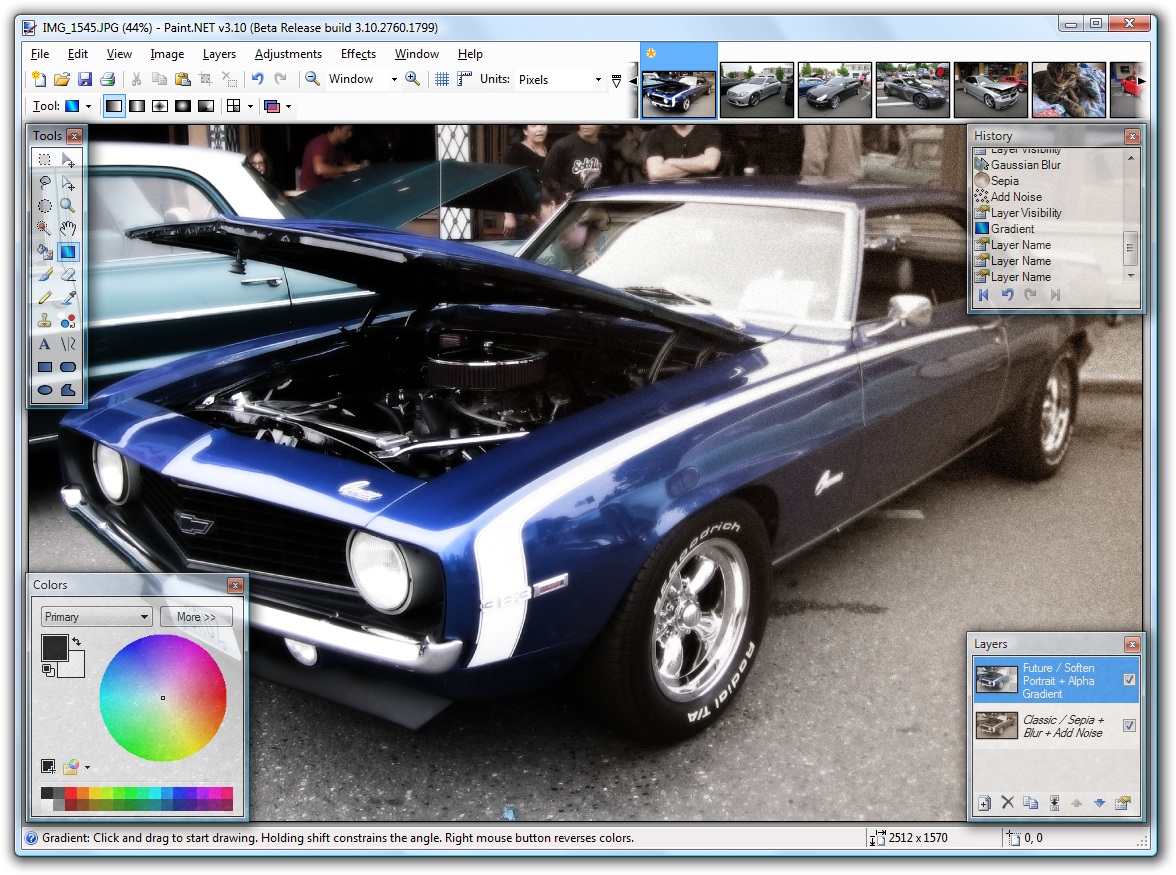
One More In .Net(Paint dot net)

[edit] Overview
Paint.NET is primarily programmed in the C# programming language, with small amounts of C++ used for installation and shell-integration related functionality. Its native image format, .PDN, is a compressed representation of the application's internal object format, which preserves layering and other information.[3] Excluding the installer, text, and graphics, Paint.NET is released under the MIT License and is open source software.

[edit] History
Paint.NET originated as a computer science senior design project during spring 2004 at Washington State University. Version 1.0 consisted of 36,000 lines of code and was written in fifteen weeks.[4] In contrast, the most recent release (version 3.30) is approximately 158,000 lines of code. The Paint.NET project continued over the summer and into the fall 2004 semester for both the version 1.1 and 2.0 releases.
Development continues with two developers who now work at Microsoft and worked on previous versions of Paint.NET while they were students at WSU. As of May 2006 the program had been downloaded at least 2 million times[5], at a rate of about 180,000 per month[6].


Plugins
Paint.NET supports DLL-file plugins, which add image adjustments, effects, and support for additional file types. They can be programmed using any .NET programming language, though they are most commonly written in C#. These are usually created by volunteer coders on the program's discussion board. Though most are simply published via the discussion board, some have been included with a later release of the program. For instance, a DirectDraw Surface file type plugin, (originally by Dean Ashton) and an Ink Sketch and Soften Portrait effect (originally by David Issel) were added to Paint.NET in version 3.10.
Many plugins have been produced; such as Shape3D, which renders a 2D drawing into a 3D shape. Some plugins expand on the functionality that comes with Paint.NET, such as Curves+ and Sharpen+.
Examples of file type plugins include an Animated Cursor and Icon plugin and an Adobe Photoshop file format plugin. Many of these are based on existing open source software, such as a RAW plugin that uses dcraw and a PNG optimization plugin that uses OptiPNG.


Home Features Donate Download Roadmap Screenshots Forum Contact
"Impressive." - PC World, #19 on "Top 100 Products of 2007"
"It raises the quality bar," - Jeff Atwood, Coding Horror
"... An absolute joy to use." - WebUser Magazine Review

AboutPaint.NET is free image and photo editing software for computers that run Windows. It features an intuitive and innovative user interface with support for layers, unlimited undo, special effects, and a wide variety of useful and powerful tools. An active and growing online community provides friendly help, tutorials, and plugins.
It started development as an undergraduate college senior design project mentored by Microsoft, and is currently being maintained by some of the alumni that originally worked on it. Originally intended as a free replacement for the Microsoft Paint software that comes with Windows, it has grown into a powerful yet simple image and photo editor tool. It has been compared to other digital photo editing software packages such as Adobe® Photoshop®, Corel® Paint Shop Pro®, Microsoft Photo Editor, and The GIMP.
The programming language used to create Paint.NET is C#, with a small amount of C++ for installation and shell-integration related functionality. The source code is available under the terms of the MIT License.